

Motivating Teams During Remote Work and RTO
Motivating Teams During Remote Work and Return-to-Office (RTO)
As flexible work evolves, organizations are navigating two powerful shifts: the enduring impact of remote work and the slow but steady push towards return to office (RTO). This hybrid world brings new challenges for team motivation, communication, and connection.
At Bravoboard, we believe that celebrating people is the heart of team culture. Whether your team is remote, hybrid, or back in-office, recognition and connection are your superpowers.
Let’s explore practical, Bravoboard-powered strategies to keep your teams engaged, connected, and motivated in 2025 and beyond.
Set Clear Goals
Clearly communicate the team's goals and objectives to ensure everyone is aligned and motivated towards a common purpose.
Foster Communication and Collaboration
Encourage open and frequent communication among team members. Use the Bravoboard to facilitate virtual meetings, brainstorming sessions, and discussions.
Recognize and Celebrate Achievements
Use Bravoboard to acknowledge and celebrate individual and team achievements. Create virtual cards to recognize milestones, completed projects, or outstanding performance.
Encourage Peer-to-Peer Recognition
Enable team members to appreciate and recognize each other's efforts through Bravoboard's peer-to-peer recognition cards. This fosters a positive and supportive team culture.
Provide Opportunities for Skill Development
Use Bravoboard to create cards that offer learning resources, webinars, or online courses. Encourage team members to enhance their skills and knowledge during remote work or RTO.
Promote Work-Life Balance
Remote work and RTO can blur the boundaries between work and personal life. Use Bravoboard to share tips, resources, and reminders to help team members maintain a healthy work-life balance.
Foster Team Bonding
Use Bravoboard's virtual cards to organize team-building activities, virtual happy hours, or online games. This helps maintain team cohesion and boosts morale.
Seek Feedback and Act on it
Create cards on Bravoboard to gather feedback from team members regarding their remote work experience or the RTO transition. Act on the feedback received to address concerns and improve the work environment.
Stay Transparent and Supportive
Use Bravoboard to share updates, company news, and important information transparently. Be supportive of team members' challenges and provide assistance when needed.
Continuously Evaluate and Adapt
Regularly assess the effectiveness of the strategies implemented using Bravoboard. Adapt and refine your approach based on feedback and evolving needs.
With Bravoboard, you can effectively motivate teams during remote work and the RTO transition, fostering collaboration, recognition, and a positive work environment.
Real-World Bravoboard Ideas to Try
-
Birthday Board: Celebrate birthdays virtually.
-
MVP of the Month: Let the team nominate!
-
Weekly Shoutout: Rotate who gets recognized.
-
RTO Memory Board: Collect selfies, “first-day-back” stories, or gratitude notes.
Motivating your team, whether they’re at home or in-office, takes intentionality and tools. Bravoboard helps you build that emotional glue that keeps teams thriving.
✅ Use Bravoboard for:
-
Consistent recognition
-
Shared milestones
-
Transparent communication
-
Building culture beyond the screen
-
🎯 Don’t wait for performance reviews to say thanks—create a Bravoboard today and start celebrating people every day.
Motivating teams during remote work and the return to office transition can be challenging, but with the right strategies and tools, it is possible to create a positive and engaged work environment. Motivation is an ongoing process, so continuously evaluate and adapt your approach to meet the evolving needs of your team. With Bravoboard, you can create a motivated and connected team, whether they are working remotely or returning to the office.
Ready to collect messages? Create your board in 60 seconds.
Create your boardComments
Comments appear after a quick review (usually within 3 hours). Be kind and on-topic
Comments
No published comments yet — share yours and help the next reader.
Add a comment
Thank you—we received your comment
Comments appear after a quick review (usually within 3 hours).
See it in action
Explore the sample boards below, then create your own for your group.
⟡ Bravoboard Samples
Get inspired by real boards
Real sample boards for everyday celebrations and milestones. Explore Bravoboard use cases
Sample gallery
Occasion and celebration boards
Browse sample boards and digital celebration walls for birthdays, holidays, work anniversaries, thank-yous, farewells, and more. Each link opens a real Bravoboard so you can see how people add messages and photos on a shared page—the same experience you get for personal boards. If you are also evaluating Bravoboard for a workplace, there are additional samples below for branding and admin-friendly privacy and moderation controls.
Sample board links open in a new browser tab.

Happy Holidays

Work Anniversary


Happy Birthday!

Get Well Soon / Recovery

Deepest Sympathies

Virtual going away card

Work Promotion

Joy and Wonder!

Celebrating Parents

4th July Holiday

Just Be Creative
Looking for workplace-oriented examples? Samples below cover branding, access rules, moderation, and embed settings.
Team plan
What guests see (Live boards)
Open a sample to experience the board the way a visitor does. For Opt-in & acknowledgement and Contributor question, open the board and then use Add message (or your board’s equivalent)—those controls appear on the new-post form, not the wall.

Branded board
See your logo and background on the wall so the board feels on-brand for your organisation.

Password to view
Guests must enter the password before they can see the board. Try adding a message, use BRAVO as the password to unlock.
Post with Code / Invite only
Anyone who can view the board still needs the posting code before they can add a message. Try adding a message, use invite code YOUROCK when prompted.

Opt-in & acknowledgement
Open the board, then start a message—guests see your notice and must tick to acknowledge before they can post. Bravoboard records each acknowledgement with a timestamp.

Contributor question
Same flow: open the board, then add a message—guests see your custom yes/no checkbox (your wording). Look for [] I would like to be included in future opportunities, in this example.

Embed & domain restriction
The same board experience, meant to be embedded on sites you have allowlisted.
Guests never see moderation queues or approval screens—those are for board owners and team admins. Use the Screenshots — how teams govern boards row for post review settings and the pending queue.
Team plan
How teams govern boards (screenshots)
These panels are where your team set rules.
Click a screenshot to open a larger view. Cards with several panels group those steps together—use the arrows in the viewer to follow the workflow.
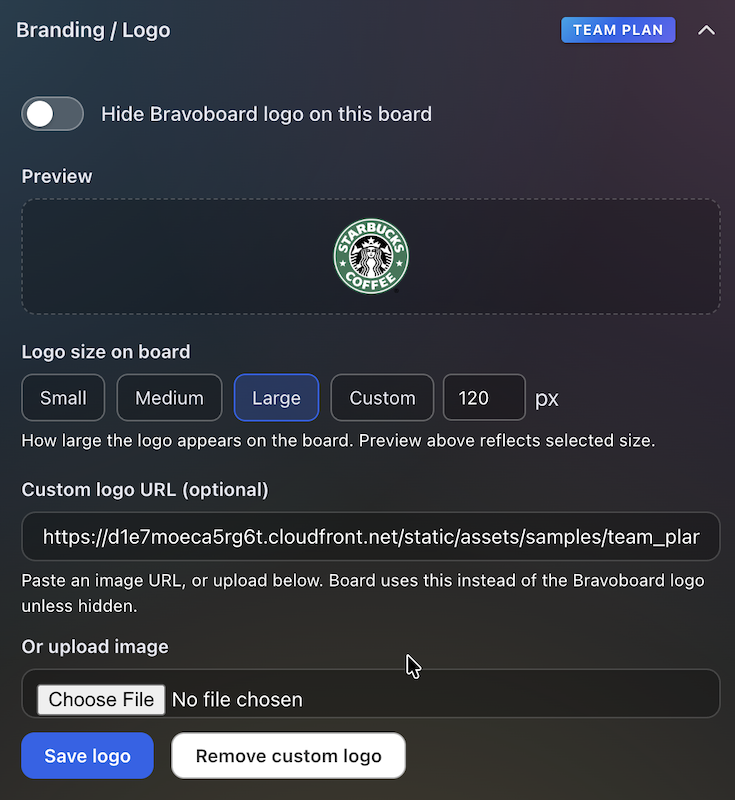
Branding & logo
Settings for uploading a logo and background so every team board matches your visual identity.
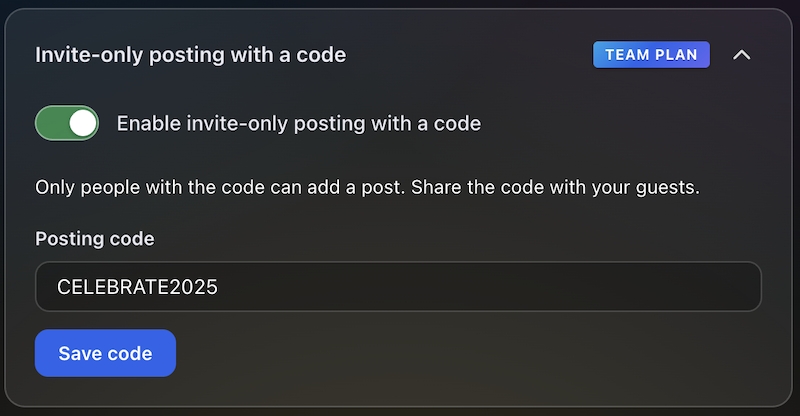
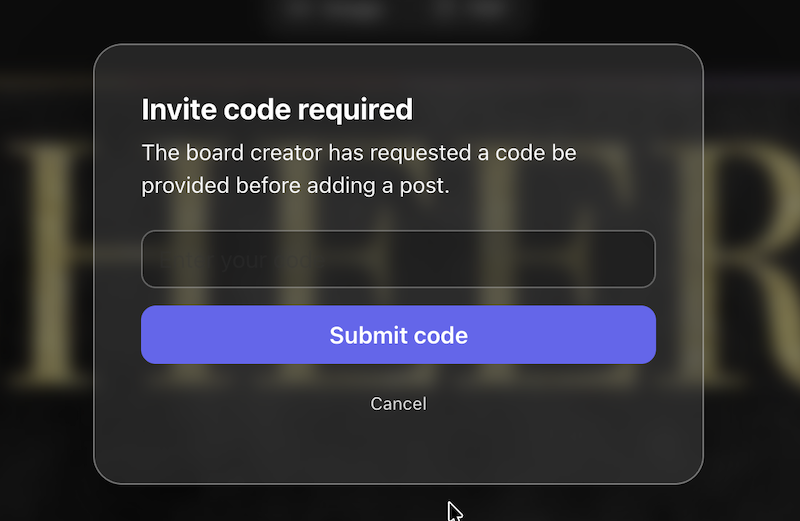
Post with Code / Invite only
Require a posting code for messages, or limit contributions to invited people only—so the wall stays readable while you control who can post.
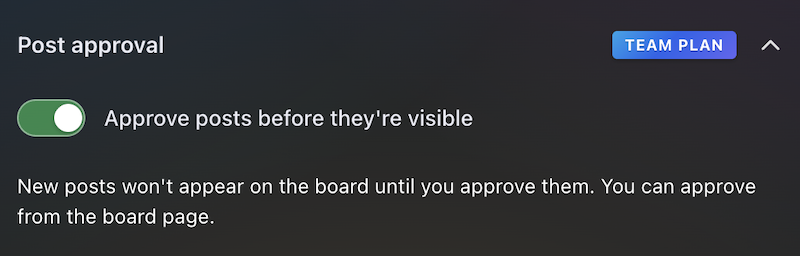
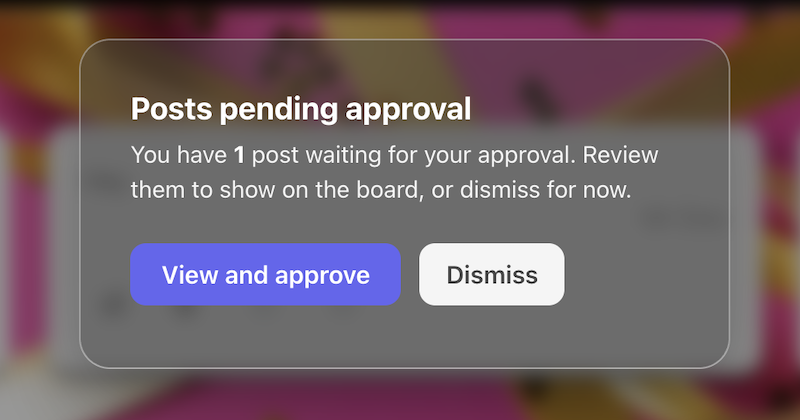
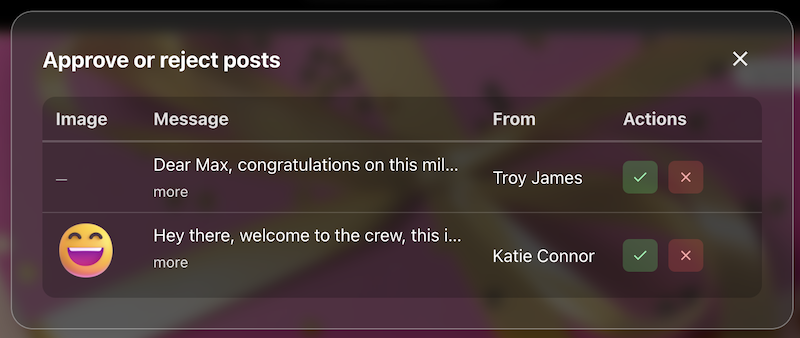
Post review
The queue or settings where approvers accept or hold posts before they appear on the live board.
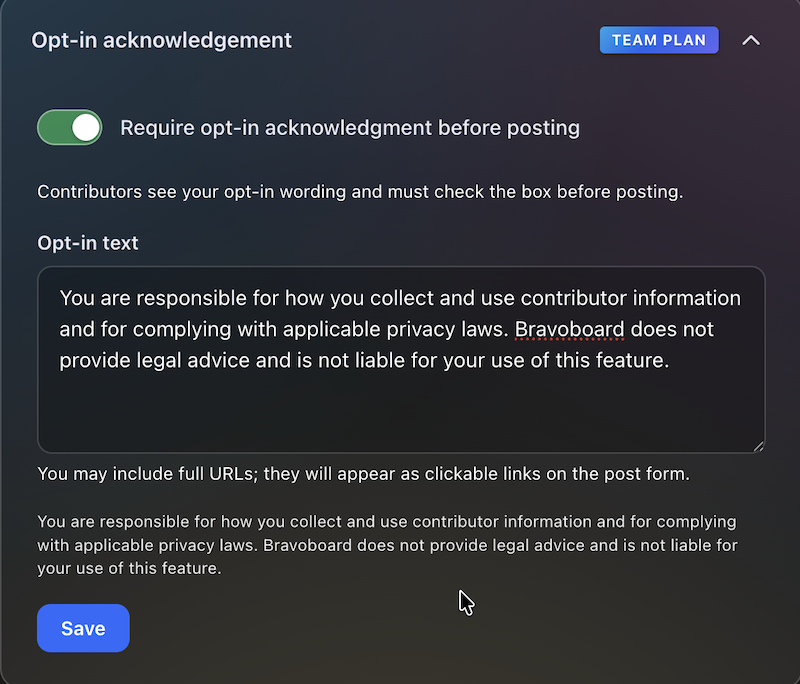
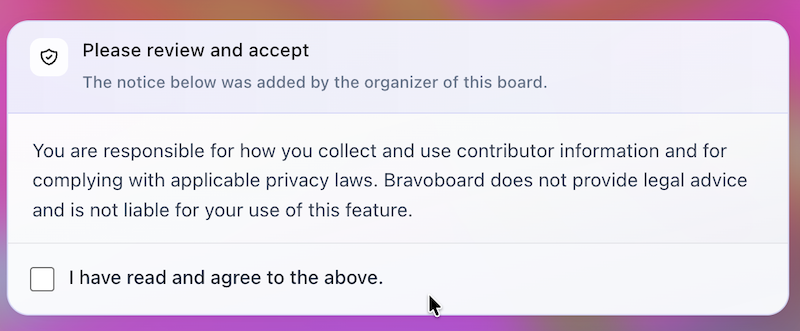
Contributor opt-in
Turn on the notice contributors must read, edit the text, and require a checkbox before posting—acknowledgements are stored with timestamps for audits and CSV export.
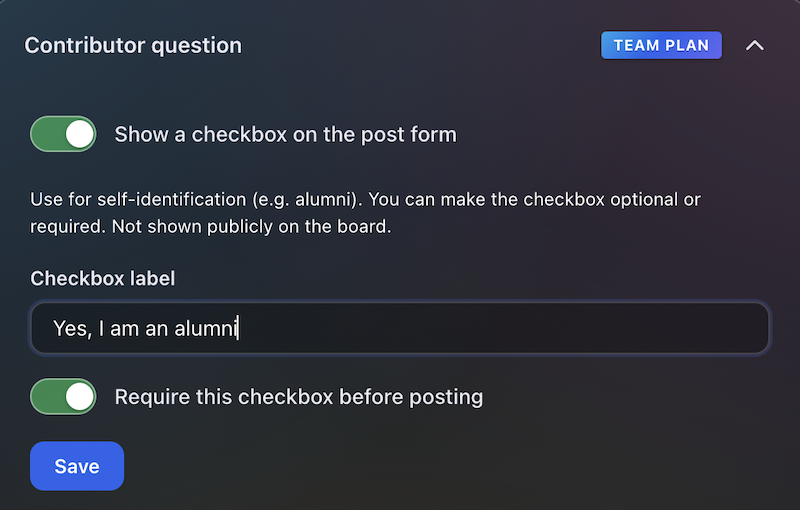

Contributor question
Contributors see this checkbox when they add a message. You write the label (for example self-ID or a light policy line), make it optional or required, and keep answers for admins and CSV export—not on the public wall.
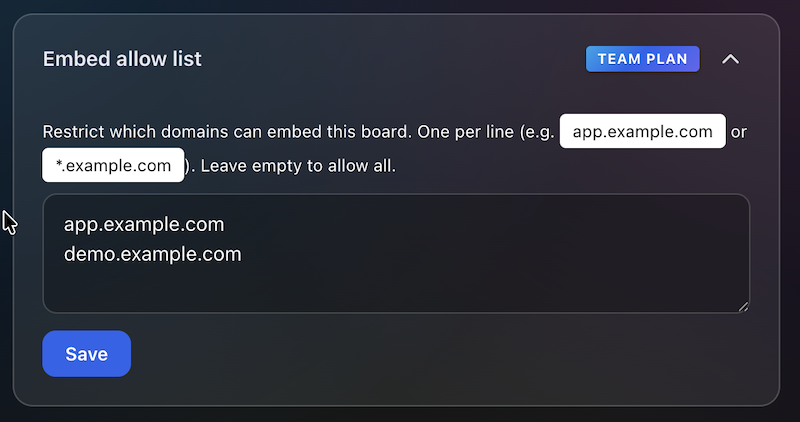
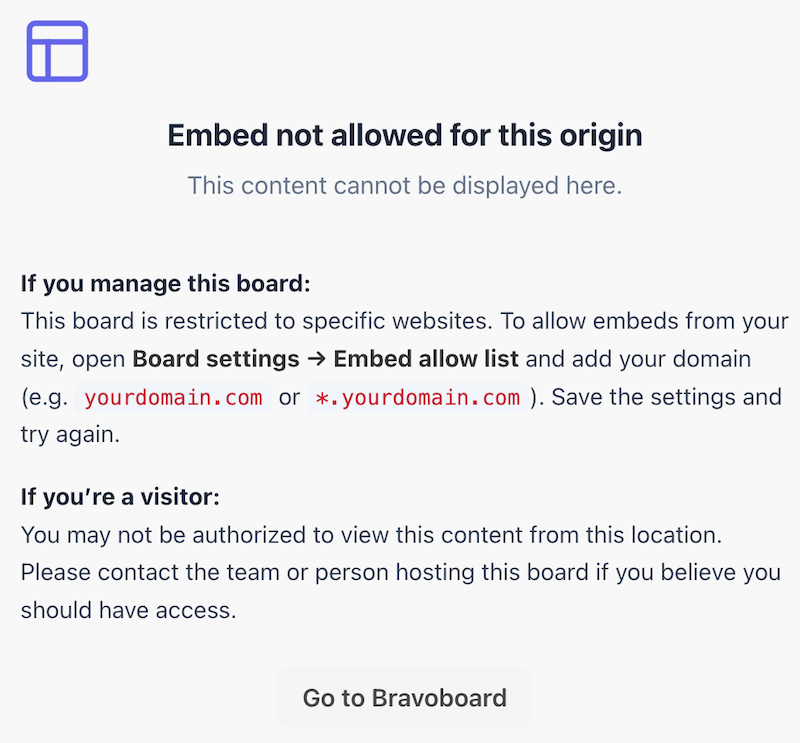
Embed domain control
Allowlist the sites that may embed this board, so it does not appear on random third-party pages.
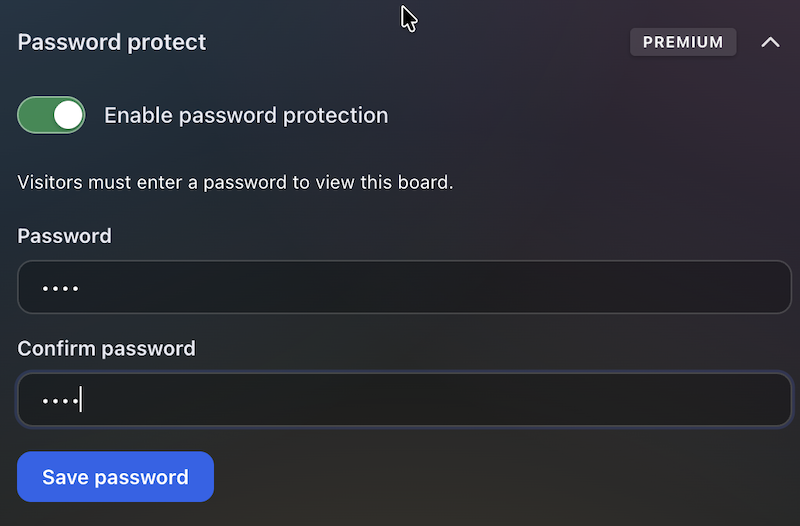
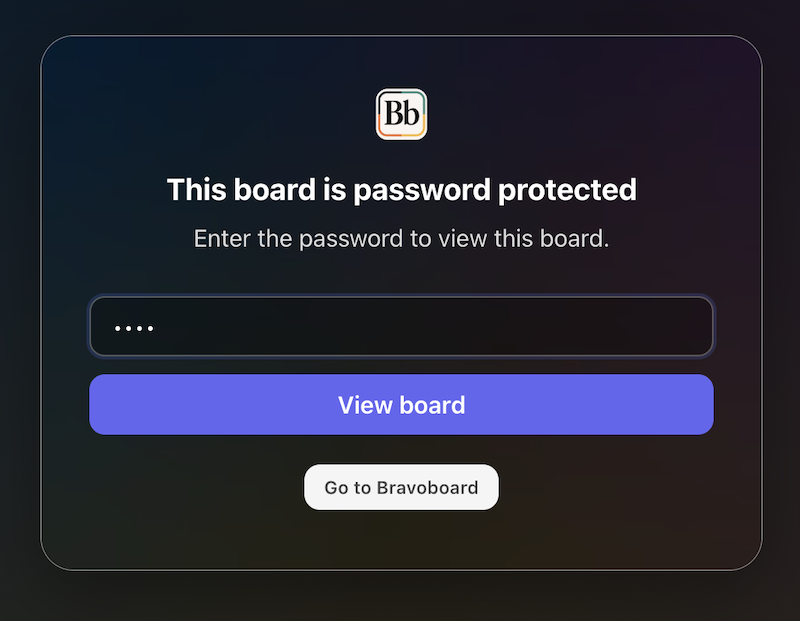
Password to view
Set a password so visitors must unlock the board before they can read it—separate from posting rules, posting codes, and invite-only contribution.
Latest Posts
You May Also Like

One board for a whole graduating class

Happy Birthday Wishes for Star Wars Fans

100 Welcome to the Team Messages for New Employees and Coworkers

50 Virtual Team Celebration Ideas for Remote Employees

How to Sign an Online Group Card (+ 75 Message Examples)

What to Write in a Group Card: 100 Message Ideas for Every Occasion

100 Birthday Wishes for Coworkers (Funny, Professional & Heartfelt)

100 Thank You Messages for Teachers to Show Your Appreciation

100 Boss Appreciation Messages to Say Thank You

100 Teacher Appreciation Messages to Say Thank You

100 Congratulations Messages for Every Occasion
