

Happy Admin Professionals' Day: Shower Your Admins with Love (and Bravoboard!)
Administrative Professionals' Day is the perfect moment to show appreciation for the real heroes behind workplace productivity, your admins. From managing calendars to solving problems on the fly, administrative professionals keep everything running seamlessly.
At Bravoboard, we believe in celebrating the unsung champions who make work life better. Whether you're in the office or remote, our collaborative online kudos boards make it easy (and fun!) to say “thank you.” Join teams across the globe in honoring your administrative pros with heartfelt messages, personalized cards, and virtual applause, all in one shared Bravoboard.
These unsung heroes tackle a multitude of tasks, ensuring everything runs smoothly and efficiently. From scheduling meetings and managing calendars to organizing events and keeping communication flowing, they are the glue that holds any successful organization together.
Bravoboard: A Fun Way to Show Appreciation (Online Cards, Collaborative Cards, E-cards)
Looking for a creative and interactive way to show your appreciation for your administrative professionals? Look no further than Bravoboard! Our online card platform makes it easy to create a virtual kudos board specifically for your admins.
Here's why Bravoboard is a great choice for Admin Professionals' Day celebrations:
- Collaborative & Engaging (Virtual Kudos Board): A kudos board is more interactive than a traditional card. People can see each other's messages and add their own well wishes, creating a positive and uplifting atmosphere.
- Memorable Celebration (Free Online Cards, Personalized Online Cards): After APD, your admins can cherish the virtual kudos board as a lasting token of your appreciation. Bravoboard even allows for downloading or printing the final product!
- Global Appreciation (Free Online Cards, Unlimited Online Cards): No matter where your team is located, Bravoboard makes celebrating Admin Professionals' Day a breeze. It's accessible worldwide, allowing teams to come together virtually and shower their admins with appreciation.
A Fun Fact Break on Admin Skills!
Did you know that according to a recent study, the average administrative professional fields over 100 phone calls and responds to more than 120 emails per day? Talk about multitasking superstars!
Here are some more fun facts to impress your colleagues (and maybe even your own admin!):
- The first typewriter was invented in 1868! While it revolutionized administrative work, the very first ribbon used for the typewriter only produced ink in one color – black!
- Sticky notes, those lifesavers for reminders, were actually invented by accident in 1968! Dr. Spencer Silver, a scientist at 3M, was working on a new type of adhesive when he created a weak bond that could be easily removed and reapplied.
- Multitasking might seem like an administrative professional's middle name, but studies show frequent task-switching can decrease productivity by up to 40%. So, next time you see your admin juggling a million things, offer a helping hand!
- According to a survey, the top skills for administrative professionals include communication, organization, problem-solving, and attention to detail. These are some pretty impressive superpowers to have!
- And lastly, a little appreciation goes a long way! A study by the Society for Human Resource Management found that employees who feel appreciated are more likely to be engaged, productive, and satisfied in their jobs. So let's shower our admins with gratitude using Bravoboard's collaborative kudos boards!
Celebrating in the Office with Bravoboard: Your One-Stop Shop for Admin Appreciation
Here are some examples of messages you can use on your Bravoboard kudos board to show appreciation for your amazing admins:
- "Dear [Admin], thank you for being the office superhero! You keep everything running smoothly, and we don't know what we'd do without you. Happy Admin Professionals' Day!"
- "[Admin], you're a master of organization and a ray of sunshine in the office. Your positive attitude makes every day brighter. We appreciate you!"
- "From scheduling meetings to keeping track of deadlines, you do it all, [Admin Name]. You're a lifesaver, and we're so grateful for your hard work. Happy Admin Professionals' Day!"
- "[Admin], your ability to multitask is truly awe-inspiring. You handle every challenge with grace and a smile. Thank you for everything you do. Happy Admin Professionals' Day!"
- "[Admin], you're the glue that holds us together. You keep us organized, informed, and well-supplied with coffee (the most important one!). Thank you for being amazing! Happy Admin Professionals' Day!"
Our administrative professionals are truly the glue that holds us together. They are the problem solvers, the organizers, and the friendly faces that greet us each day. Let's take this opportunity, and every opportunity, to express our sincere appreciation for all they do. Happy Admin Professionals' Day!
Let's keep the positivity flowing and show our gratitude throughout the year. And for a truly memorable celebration, create a collaborative kudos board on Bravoboard!
Ready to collect messages? Create your board in 60 seconds.
Create your boardComments
Comments appear after a quick review (usually within 3 hours). Be kind and on-topic
Comments
No published comments yet — share yours and help the next reader.
Add a comment
Thank you—we received your comment
Comments appear after a quick review (usually within 3 hours).
See it in action
Explore the sample boards below, then create your own for your group.
⟡ Bravoboard Samples
Get inspired by real boards
Real sample boards for everyday celebrations and milestones. Explore Bravoboard use cases
Sample gallery
Occasion and celebration boards
Browse sample boards and digital celebration walls for birthdays, holidays, work anniversaries, thank-yous, farewells, and more. Each link opens a real Bravoboard so you can see how people add messages and photos on a shared page—the same experience you get for personal boards. If you are also evaluating Bravoboard for a workplace, there are additional samples below for branding and admin-friendly privacy and moderation controls.
Sample board links open in a new browser tab.

Happy Holidays

Work Anniversary

Happy Birthday!

Get Well Soon / Recovery

Deepest Sympathies

Virtual going away card

Work Promotion

Joy and Wonder!

Celebrating Parents

4th July Holiday

Just Be Creative
Looking for workplace-oriented examples? Samples below cover branding, access rules, moderation, and embed settings.
Team plan
What guests see (Live boards)
Open a sample to experience the board the way a visitor does. For Opt-in & acknowledgement and Contributor question, open the board and then use Add message (or your board’s equivalent)—those controls appear on the new-post form, not the wall.

Branded board
See your logo and background on the wall so the board feels on-brand for your organisation.

Password to view
Guests must enter the password before they can see the board. Try adding a message, use BRAVO as the password to unlock.
Post with Code / Invite only
Anyone who can view the board still needs the posting code before they can add a message. Try adding a message, use invite code YOUROCK when prompted.

Opt-in & acknowledgement
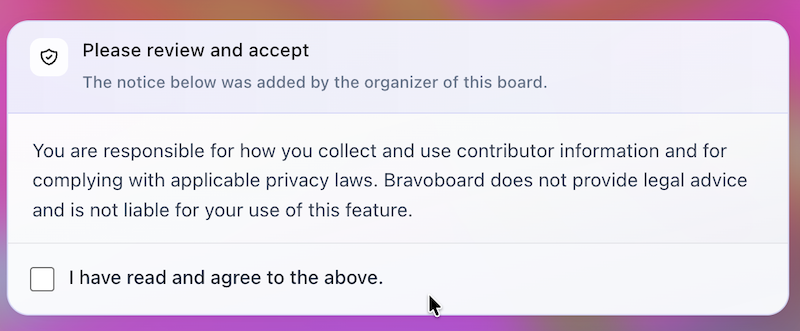
Open the board, then start a message—guests see your notice and must tick to acknowledge before they can post. Bravoboard records each acknowledgement with a timestamp.

Contributor question
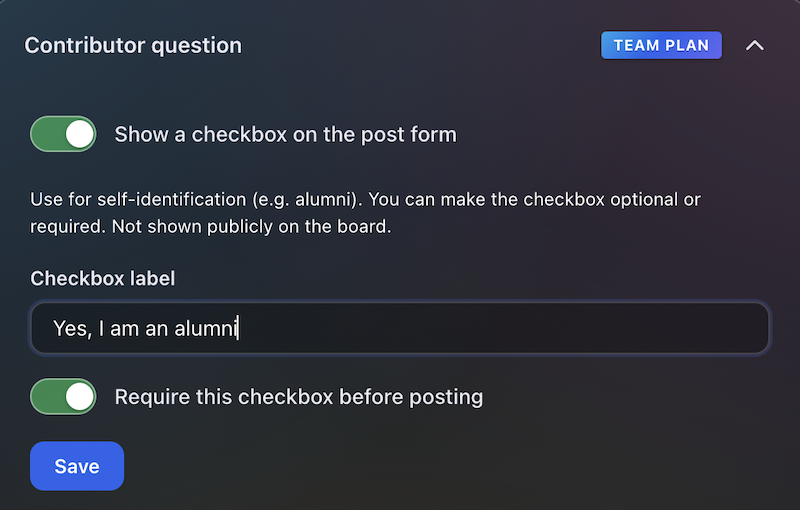
Same flow: open the board, then add a message—guests see your custom yes/no checkbox (your wording). Look for [] I would like to be included in future opportunities, in this example.

Embed & domain restriction
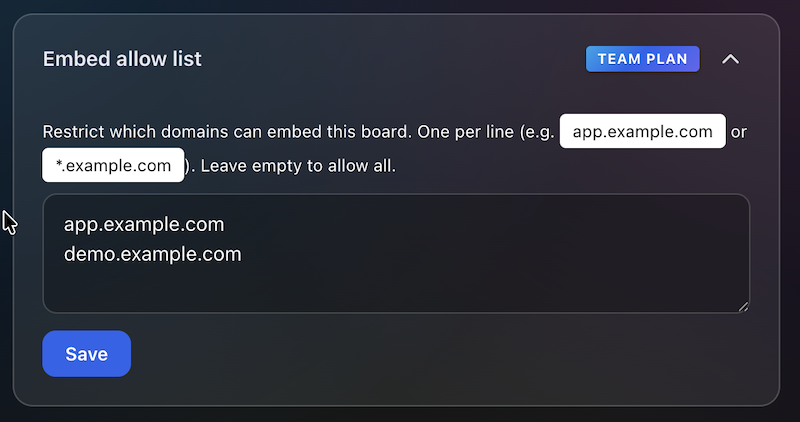
The same board experience, meant to be embedded on sites you have allowlisted.
Guests never see moderation queues or approval screens—those are for board owners and team admins. Use the Screenshots — how teams govern boards row for post review settings and the pending queue.
Team plan
How teams govern boards (screenshots)
These panels are where your team set rules.
Click a screenshot to open a larger view. Cards with several panels group those steps together—use the arrows in the viewer to follow the workflow.
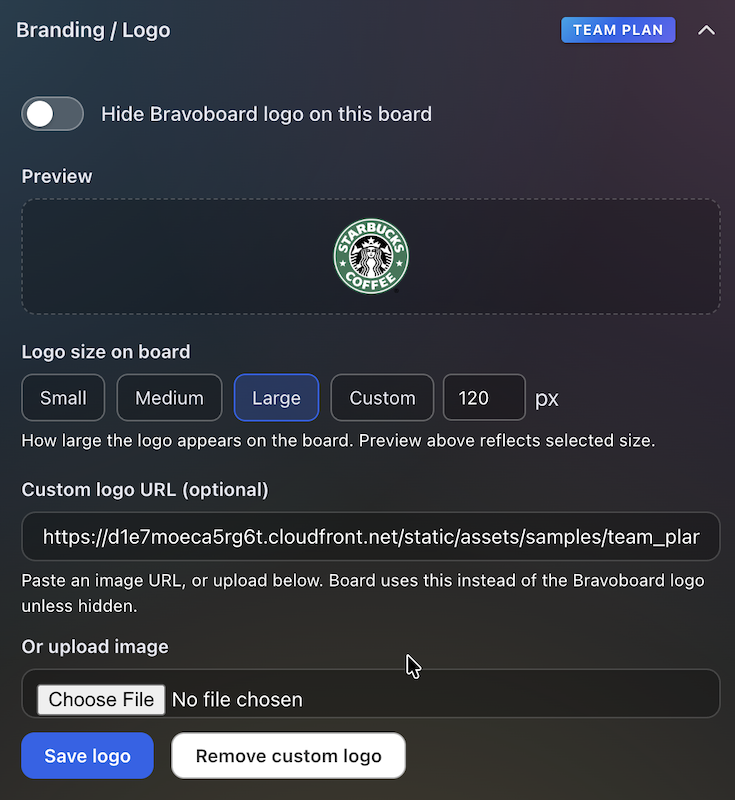
Branding & logo
Settings for uploading a logo and background so every team board matches your visual identity.
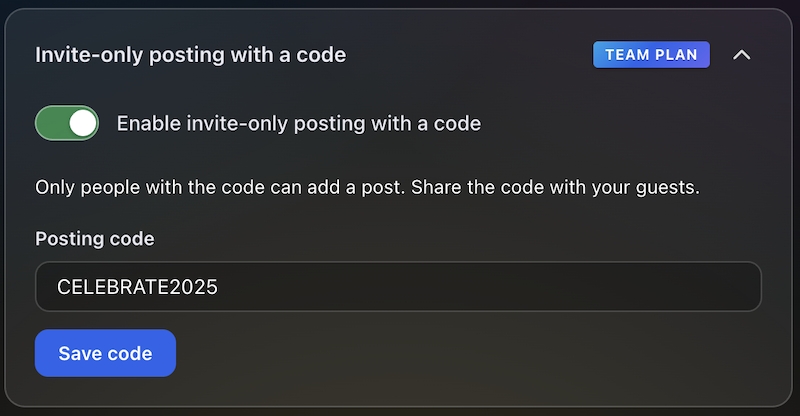
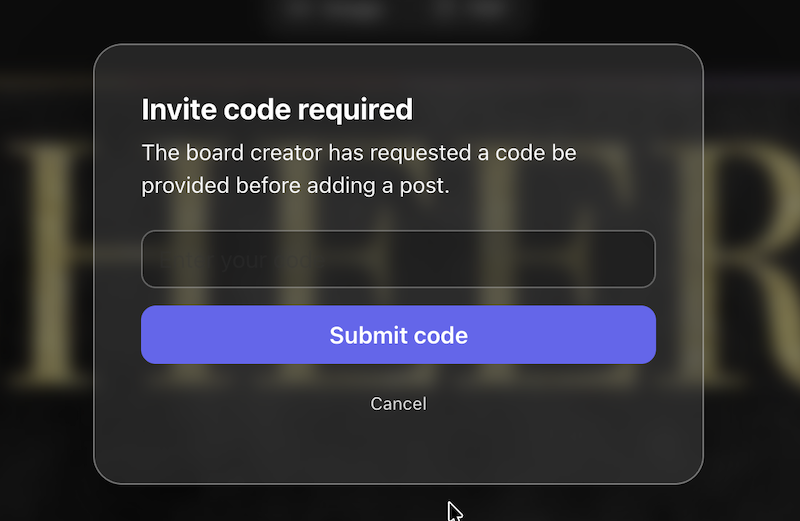
Post with Code / Invite only
Require a posting code for messages, or limit contributions to invited people only—so the wall stays readable while you control who can post.
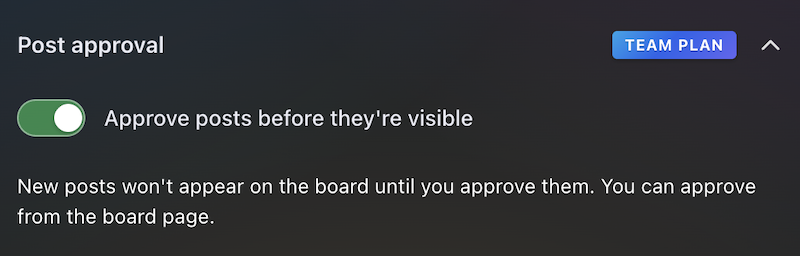
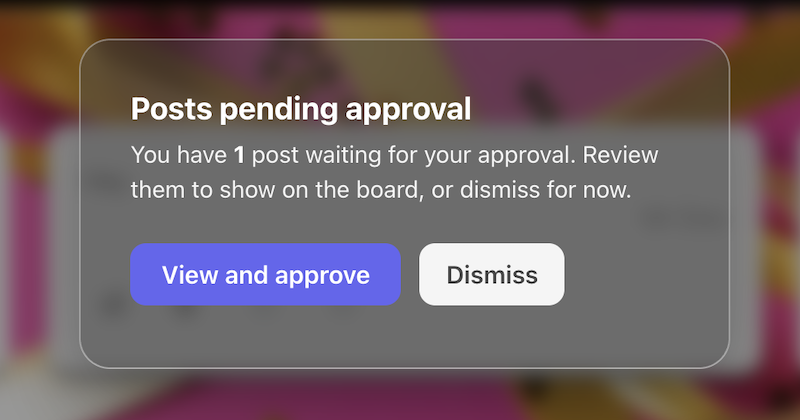
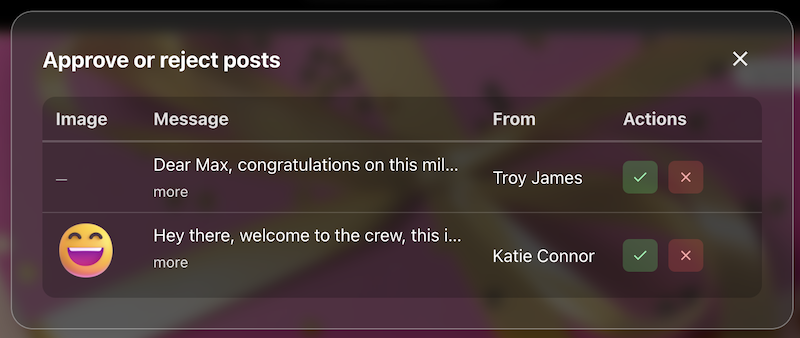
Post review
The queue or settings where approvers accept or hold posts before they appear on the live board.
Contributor opt-in
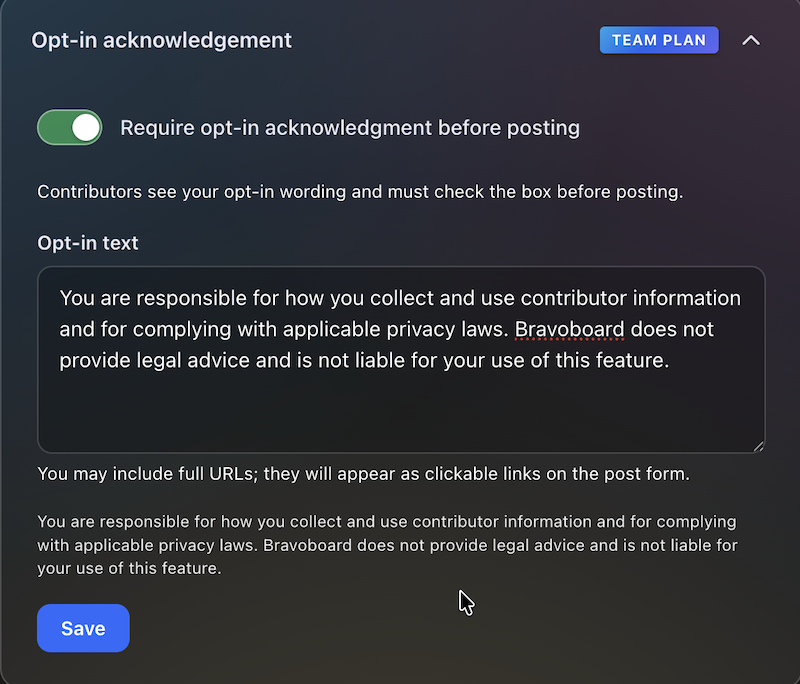
Turn on the notice contributors must read, edit the text, and require a checkbox before posting—acknowledgements are stored with timestamps for audits and CSV export.

Contributor question
Contributors see this checkbox when they add a message. You write the label (for example self-ID or a light policy line), make it optional or required, and keep answers for admins and CSV export—not on the public wall.
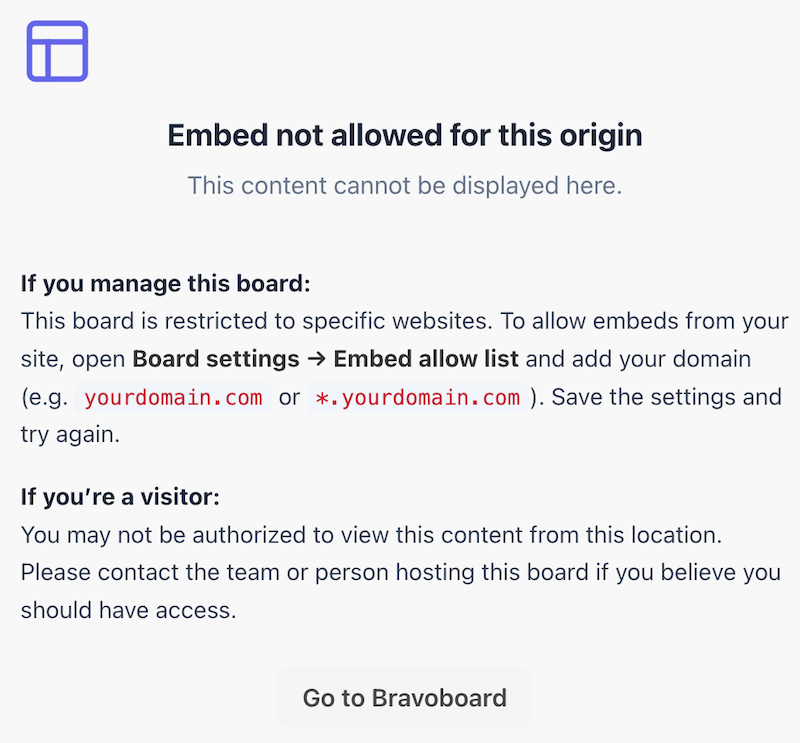
Embed domain control
Allowlist the sites that may embed this board, so it does not appear on random third-party pages.
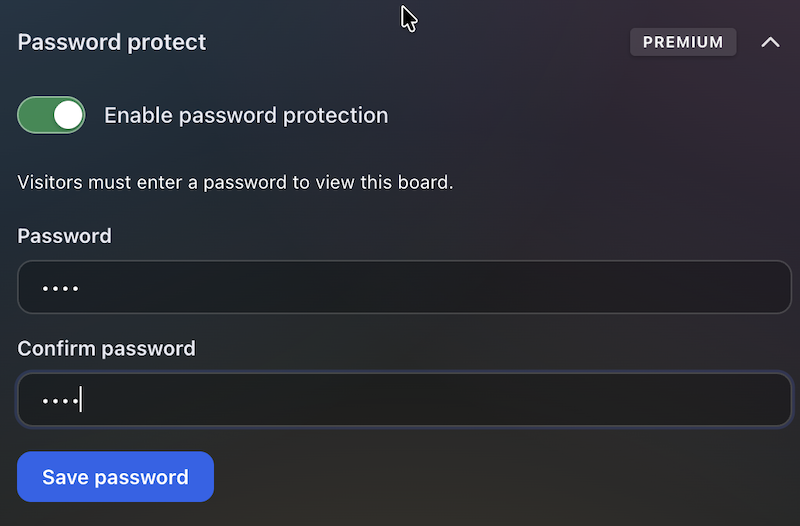
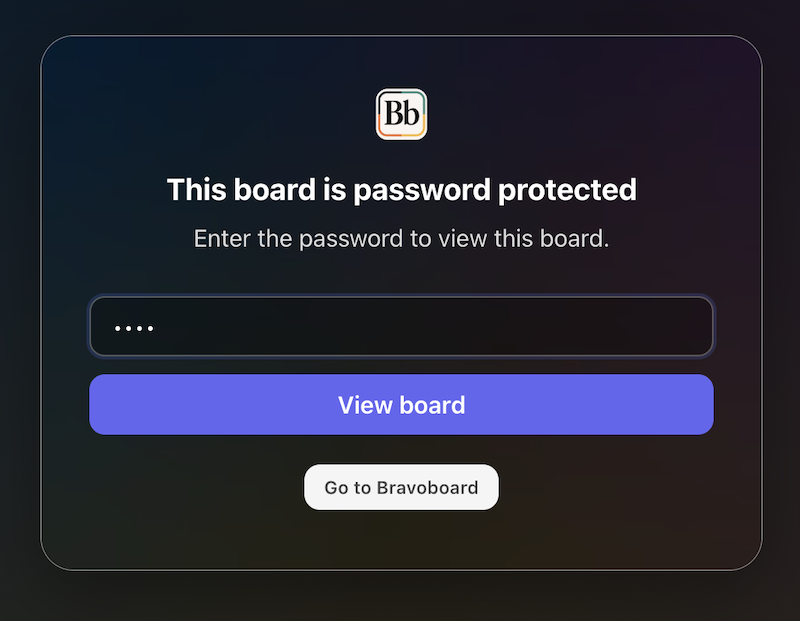
Password to view
Set a password so visitors must unlock the board before they can read it—separate from posting rules, posting codes, and invite-only contribution.
Latest Posts
You May Also Like

One board for a whole graduating class

Happy Birthday Wishes for Star Wars Fans

100 Welcome to the Team Messages for New Employees and Coworkers

50 Virtual Team Celebration Ideas for Remote Employees

How to Sign an Online Group Card (+ 75 Message Examples)

What to Write in a Group Card: 100 Message Ideas for Every Occasion

100 Birthday Wishes for Coworkers (Funny, Professional & Heartfelt)

100 Thank You Messages for Teachers to Show Your Appreciation

100 Boss Appreciation Messages to Say Thank You

100 Teacher Appreciation Messages to Say Thank You

100 Congratulations Messages for Every Occasion
